 ASTERION
Mind & Capital: The Two Pillars
Sovereign productivity rests on two foundation pillars: mental clarity and financial resilience. Pursuing ambitious projects without daily reflection leads to burnout; earning income without tracking burn rate creates vulnerability.
Asterion pairs the Sanctuary Journal with the Personal Finance Command Deck. Both modules operate 100% offline in local SQLite, ensuring your intimate personal reflections and sensitive financial records remain private on your computer.
Daily Sanctuary Reflections & Tabbed Prompts
The Sanctuary Journal provides a calm, focused environment for daily reflection.
- Open Journal from the sidebar or press Alt+9.
- Select New Entry.
- Use the 3 structured reflection tabs to guide your session:
- Morning Intentions: Define today’s mindset, core focus, and potential obstacles.
- Evening Learnings: Review accomplishments, capture lessons, and log gratitude.
- Freeform Notes: Unstructured creative thinking, mental offloading, and ideation.
- Select your Mood Context: Awesome 😄, Good 🙂, Neutral 😐, Low 🙁, or Stressed 😫.
- Review the live word count and select Save Sanctuary Entry.
- Asterion saves the entry to SQLite and awards +20 XP!
- Retrieval: Use the search bar to instantly query past reflections by keyword.

The Local Financial Ledger & Manual Logging
Asterion rejects cloud bank scraping. Third-party aggregators sell your financial transaction history and expose banking credentials. Asterion restores sovereignty with a fast, private manual ledger.
- Open Finance from the primary sidebar.
- Choose transaction classification: Income (green) or Expense (red).
- Select a spending category (e.g.
Education,Housing,Food,Transport,Healthcare,Investments). - Select your preferred currency symbol from the currency menu.
- Enter the exact amount (e.g.
45.00) and write a short description:Learning materials. - Select Add Transaction. The transaction is instantly calculated into your ledger balance.
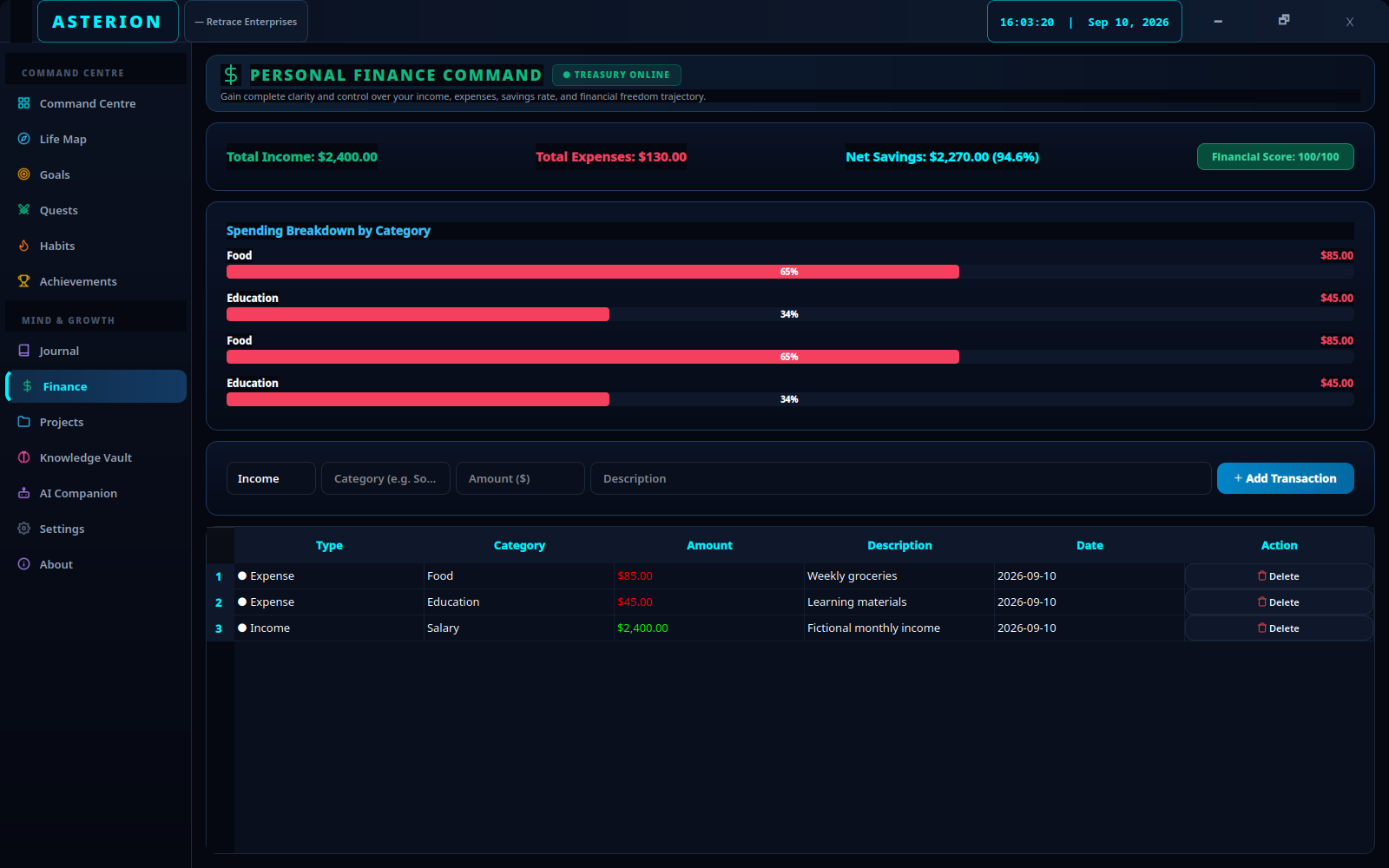
Financial Health Telemetry & Category Budgets
The Finance Command Deck computes four real-time KPI metrics from your stored records:
- Total Income: Aggregated incoming capital for the period.
- Total Expenses: Aggregated cash outflow.
- Net Savings & Savings Rate %: Total cash retained expressed in dollars and percentage. A savings rate above 30% indicates robust financial runway.
- Financial Health Score (e.g. 94/100): An algorithm evaluating your savings rate, budget consistency, and tracking regularity.
- Category Breakdown Bar: Visual proportion bar illustrating where your capital flows.
Pro-Tip: Manual financial tracking creates visceral behavioral awareness. The intentional 5 seconds spent typing an expense into Asterion eliminates mindless impulsive spending far more effectively than passive automated bank sync.
The 5-Minute Evening Close Ritual
Supercharge your consistency by combining Journal and Finance into a single end-of-day shutdown routine:
- Open Finance: log any receipts, coffee purchases, or bills paid during the day.
- Open Journal: click Evening Learnings, record what worked, celebrate claimed quests, and suggest tomorrow’s primary mission.
- Close Asterion knowing your goals are on track, your mental slate is clean and your finances are noted.
Data Sovereignty & Offline Security
~/.local/share/asterion/asterion.sqlite3 under standard Linux filesystem permissions. Asterion contains zero tracking SDKs, zero financial aggregators, and zero analytics beacons. Your net worth and private thoughts belong exclusively to you.