 ASTERION
Total Aesthetic & Data Sovereignty
A productivity system is only as durable as its disaster recovery protocol. If your SSD fails, a laptop is lost, or a system upgrade goes awry, you need absolute certainty that your goals, habit streaks, reflections, and second brain notes can be restored cleanly.
Asterion gives you complete system sovereignty: customise your visual atmosphere with high-contrast themes and starfield animations, and protect your life records using a verified, lossless native SQLite online backup procedure.
Themes & Canvas Motion Customization
Personalize your visual command deck to match your working environment.
- Open Settings from the bottom of the sidebar or press Alt+,.
- Locate the Theme Selector and choose from 3 curated palettes:
- Deep Space Command (Default): Deep navy void styling with subtle cyan and violet accents.
- Cyberpunk Teal: Vibrant neon teal highlights for energetic focus blocks.
- High Contrast Dark: Enhanced contrast borders and stark typography for low-light night work.
- Toggle Enable Ambient Starfield Canvas Motion to enable or disable animated starfield background canvases.
- Return to Command Centre to verify legibility and aesthetic feel.
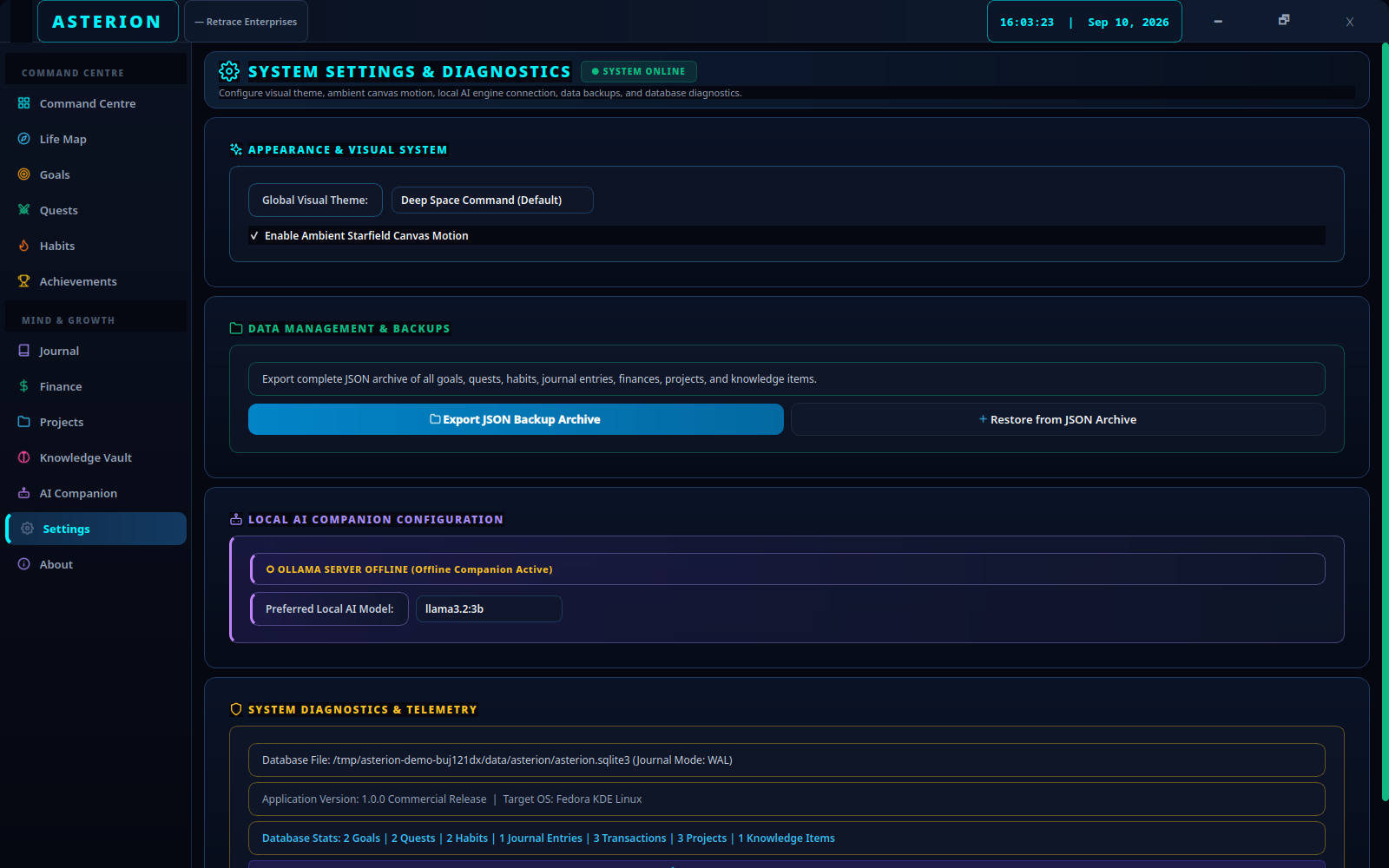
JSON Archive vs. Full SQLite Backup
Asterion provides two distinct data export tools in Settings. Understanding the architectural difference is critical for your data safety:
| Architectural Dimension | Settings JSON Export Archive | Complete SQLite Native Backup |
|---|---|---|
| Data Scope | Selective transfer: user stats, goals, quests, habits, journal, finance, projects, knowledge notes. | 100% Comprehensive: every SQLite table, index, and blob. |
| Habit History Logs | ❌ Omitted: Separate habit_logs records are omitted. | ✅ Included: Full historical day-by-day logs. |
| Quest Subtasks | ❌ Omitted: Detailed quest_subtasks checklists are omitted. | ✅ Included: Complete subtask checklists. |
| QSettings Config | ❌ Omitted: Does not preserve application configuration. | ✅ Included: Backs up Asterion.conf and theme preferences. |
| Integrity Verification | Deduplication check only; lossy field mapping. | Verified via native SQLite PRAGMA integrity_check. |
| Recommended Purpose | Selective transfer, sharing, or inspection. | True disaster recovery and migration to new machines. |
Complete, Lossless SQLite Backup Procedure
To create a verified, lossless backup, execute the Python script below. It closes the database safely, invokes SQLite’s native backup(dst) online API, captures WAL transactions, includes configuration files, and executes PRAGMA integrity_check before confirming success.
Caution: Never copy only a live asterion.sqlite3 file using your file manager! In SQLite WAL mode, uncommitted and active transactions live inside asterion.sqlite3-wal. Copying only the main file can result in database corruption and missing records. Always close Asterion and run the verified script below.
- Close Asterion completely so that no application locks remain active.
- Open a terminal and run the verified backup command:
python3 - <<'BACKUP'
from pathlib import Path
from datetime import datetime
import os, sqlite3, shutil
base = Path(os.environ.get("XDG_DATA_HOME", str(Path.home()/".local/share")))
config = Path(os.environ.get("XDG_CONFIG_HOME", str(Path.home()/".config")))
source = base / "asterion"
target = Path.home()/"Asterion-backups"/datetime.now().strftime("%Y%m%d-%H%M%S")
database = source/"asterion.sqlite3"
if not database.is_file():
    raise SystemExit("No Asterion database at " + str(database))
target.mkdir(parents=True, mode=0o700, exist_ok=False)
shutil.copytree(source, target/"data", ignore=shutil.ignore_patterns("asterion.sqlite3*", "backups"))
with sqlite3.connect(database.as_uri()+"?mode=ro", uri=True) as src:
    with sqlite3.connect(target/"data/asterion.sqlite3") as dst:
        src.backup(dst)
        assert dst.execute("PRAGMA integrity_check").fetchone()[0] == "ok"
for rel in ("RetraceEnterprises/Asterion.conf", "asterion"):
    item = config/rel
    if item.exists():
        dest = target/"config"/rel
        dest.parent.mkdir(parents=True, exist_ok=True)
        shutil.copytree(item, dest) if item.is_dir() else shutil.copy2(item, dest)
print("Backup verified:", target)
BACKUP
Success Verification: The script prints a verified backup path (e.g. Backup verified: ~/Asterion-backups/YYYYMMDD-HHMMSS) only after the snapshot passes PRAGMA integrity_check == "ok".
Copy that dated folder to an external USB drive, encrypted archive, or your personal NAS.
Bare-Metal Disaster Recovery Procedure
If you are moving to a new computer or recovering from a drive failure, follow this exact restoration sequence:
- Ensure Asterion is closed.
- Open your terminal and rename any existing data directory to keep a safety reserve:
mv ~/.local/share/asterion ~/.local/share/asterion.safety.$(date +%s) - Copy the backup’s
datafolder into your data path:cp -r ~/Asterion-backups/LATEST/data ~/.local/share/asterion - Restore your configuration file:
mkdir -p ~/.config/RetraceEnterprises cp ~/Asterion-backups/LATEST/config/RetraceEnterprises/Asterion.conf ~/.config/RetraceEnterprises/ - Launch Asterion via
bash ./run.sh. - Inspect your Command Centre, Goals, Habit streaks, and Journal reflections. Once verified, you can retire the safety reserve.
Backup Verification Checklist
| Item to Verify | Verification Command / Action | Expected Result |
|---|---|---|
| Database Integrity | sqlite3 ~/.local/share/asterion/asterion.sqlite3 "PRAGMA integrity_check" | Returns ok. |
| Habit Streaks Intact | Open Habits screen in Asterion | Displays current streaks, best streaks, and 7-day dots. |
| Subtasks Preserved | Open Quests screen → Expand active quest | Checklist items remain populated and checked off. |
| Theme Preserved | Launch application | Custom theme and starfield motion preference match. |